Preparation Steps
Important Notes:
3. Wait for the Results:
Post-Test Steps
Important Notice:
After performing a blood test with the Multi-Functional Monitoring System, the specific measurement (e.g., ketone, glucose, uric acid, total cholesterol, lactate) can be transferred and saved in the ePokratis MedAiConnect app upon request. Once the transfer is complete, all data stored in the device's memory will be automatically deleted.
This deletion process applies in two cases:
Please note that the transfer time may increase if multiple measurements are stored in the device. To optimize performance and ensure quicker future transfers, the device’s memory is cleared after each successful transfer, keeping the system ready for new readings.
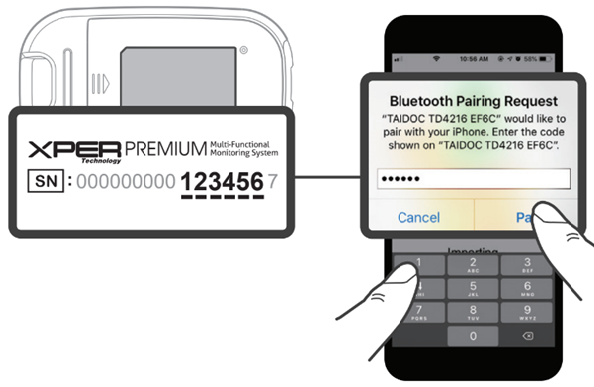
Pairing a Device for the First Time
Remove Device
Are you sure you want to remove this configured device?
You will need to reconfigure it if you wish to use it again later.
Cancel | Remove
5. Tap "Remove" to confirm. The device will be removed from "Configured Devices". To reconfigure the device later, ensure Bluetooth is active and tap "Reload". The device will then appear under "Add Devices".
Replacing a Device
A device of the same model is already configured.
Are you sure you want to continue configuring this new device?
If you proceed, the previously configured device of this model will be removed and replaced by the new one.
Cancel | Confirm
5. To replace the existing device, tap "Confirm". The previous device will be removed from "Configured Devices", and the new device will take its place.
If Bluetooth is Paired (Toggle Activated)
If Bluetooth is Not Paired (Toggle Not Activated)
Device not found, turned off, or malfunctioning
If the device is turned off, out of range, or malfunctioning, the following error message will appear:
"Device not found nearby, turned off, or may be malfunctioning. Please ensure it is powered on and placed close to your mobile phone. If the issue persists, consider replacing the device."
A "Retry" button will appear, allowing you to attempt reconnection once the device is powered on and within range.
Method 1
Method 2